TaxDome Price Increase 2026: Why Small Firms Could Pay 2x (or More) — and the Best Alternatives
TaxDome just moved from per-seat to per-client pricing: $1,500/year for 150 active clients, then $15 per account. Large teams save; solo and small firms with big client lists can see their bill double or worse. Here's the math, the best TaxDome alternatives (BytesHood, Canopy, Karbon, Financial Cents, Uku), and whether building your own client portal is realistic.
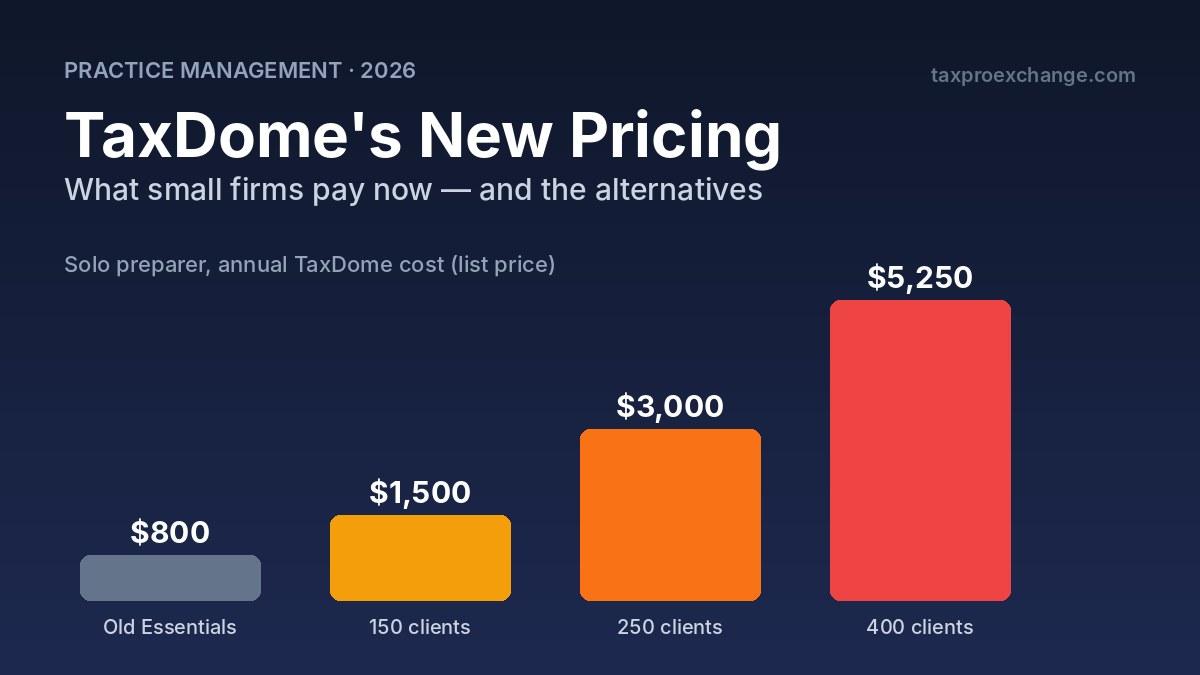
TaxDome's new per-client pricing rewards big teams and hits solo practitioners with large client lists hardest.
If you run a small tax practice on TaxDome, check your renewal date today.
On November 2, 2026, TaxDome replaced its per-seat plans with per-client pricing. New firms are on it now. Existing firms move over at their first renewal on or after January 1, 2027. For a 10-person firm, the change can cut the bill in half. For a solo preparer with a few hundred clients, it can double it — or more.
I'm a solo preparer myself. My own TaxDome renewal quote went from roughly $800 a year to about $1,700. That's what pushed me to dig into the numbers, the alternatives, and one option most tax pros haven't seriously considered: building their own stack.
Quick answer:
- TaxDome's new price: $1,500/year base, includes 150 active client accounts and up to 20 team members. Extra accounts cost $15 each on demand, or less in prepaid packs.
- Who pays more: Solo and 2–3 person firms with more than ~150 active clients.
- Who pays less: Firms with many staff and a modest client count.
- Best alternatives for small firms: BytesHood (unlimited clients, tax-focused), Financial Cents or Uku (cheapest), Canopy (closest all-in-one), Karbon (team workflow and email).
- Build your own: Realistic now for tech-comfortable firms using AI coding tools — but you inherit the security and compliance burden.
What Changed: TaxDome's Old vs. New Pricing
Until November 2026, TaxDome charged per user, per year, billed upfront:
| Plan (old) | 1-year price per user | 3-year price per user |
|---|---|---|
| Essentials (solo only) | $800 | $700 |
| Pro | $1,000 | $900 |
| Business | $1,200 | $1,100 |
The new US model collapses those three plans into one plan with every core feature, priced by active client accounts:
| New TaxDome pricing | Details |
|---|---|
| Base subscription | $1,500/year |
| Included | First 150 active accounts, up to 20 team members |
| Extra accounts | $15 each on demand; cheaper in prepaid packs |
| AI add-on (incl. API access) | $200/month for the workspace, after a 14-day trial |
| Client Care (client support service) | $100 add-on, can be toggled month to month |
| Premium Support | $249/month |
| Over 20 staff or 3,000 accounts | Custom pricing |
Usage inside an account stays unlimited — documents, e-signatures, invoices and organizers are not metered.
What counts as an "active" client account?
This is the number that drives your bill, so read it carefully. An account becomes active when you or the client does something with it during the plan year — creating a job, issuing an invoice, uploading a document, or logging into the portal. Once active, it stays counted for the rest of the year.
A few details that work in your favor:
- An account is not a contact. A married couple filing jointly is one account. A business with three owners logging in is one account.
- Emails you send and documents added through TaxDome's migration tool don't activate an account.
- Importing your full client list doesn't automatically make every record billable.
The catch: almost every tax client you actually serve in a season will trigger activity. If you file 300 returns, plan on roughly 300 active accounts.
The Math: Who Pays More and Who Pays Less
Using TaxDome's published list prices ($1,500 base + $15 per extra account, before packs or incentives):
| Firm profile | Old TaxDome (1-yr) | New TaxDome (list) | Change |
|---|---|---|---|
| Solo, 150 active clients | $800 | $1,500 | +88% |
| Solo, 250 active clients | $800 | $3,000 | +275% |
| Solo, 400 active clients | $800 | $5,250 | +556% |
| 2 people (Pro), 300 clients | $2,000 | $3,750 | +88% |
| 5 people (Pro), 200 clients | $5,000 | $2,250 | −55% |
| 10 people (Business), 400 clients | $12,000 | $5,250 | −56% |
Prepaid packs bring the per-account cost below $15. Financial Cents, a competitor, cites about $4,125/year for 400 active clients and $9,000 for 1,000. Even at pack pricing, a solo preparer with 400 clients pays roughly five times the old Essentials rate.
The pattern is clear: the new model rewards headcount and penalizes client volume. That's the opposite of how a lean, high-volume solo practice is built.
What about TaxDome's transition discounts?
To be fair to TaxDome, existing customers get a personalized transition plan inside their portal. Co-founder Ilya Radzinsky told Accounting Today that smaller existing firms get 50% off the extra accounts they buy, with further discounts for firms using TaxDome's payment processing, and that the average transitioning firm should land around $5–7 per account per year once incentives are applied.
That can soften the blow considerably. But three things are worth weighing:
- Discounts are transition offers. The list price is $15. Plan for what happens at the renewal after next.
- Payment-processing discounts tie you in further. Moving your invoicing to TaxDome Pay lowers the price and raises the switching cost.
- TaxDome committed to per-seat pricing for nine years — including in its 2024 and 2025 annual reports — before reversing. Pricing that can change once can change again.
None of this makes TaxDome a bad product. It's still one of the most complete all-in-one platforms for tax firms. It does mean every small firm should price out its actual renewal before auto-renewing.
The Best TaxDome Alternatives for Small Tax Firms
Prices below are annual-billing list prices as published in mid-to-late 2026. Several figures come from vendor comparison pages written by competitors, so confirm on each vendor's pricing page before deciding.
| Tool | Pricing model | Solo cost / year | Client portal | E-signature | Best for |
|---|---|---|---|---|---|
| TaxDome (new) | Per active client | $1,500 (≤150 clients) | Yes, plus mobile app | Unlimited | Larger teams, all-in-one |
| BytesHood | Per firm (staff seats), unlimited clients | $500 (first-year intro) | Yes | Included; KBA $1.50–$2 per check | Solo and small tax firms leaving TaxDome |
| Canopy | Per user + credits | ~$888 (Standard) | Included | Included; KBA ~$1.25/credit | Tax-focused all-in-one, resolution work |
| Karbon | Per user | ~$708 (Team) | Basic | Credits sold separately | Teams, email-heavy workflow |
| Financial Cents | Per user | ~$228 (Solo) | Yes | Check current plan | Budget solo/small firms |
| Uku | Per user | ~$228 (Solo) | Yes | Included (Solo) | Bookkeeping-heavy firms |
BytesHood — the newcomer built for small tax firms
BytesHood is a newer practice suite from a US-based team in Binghamton, New York, and it's pitched squarely at the firms TaxDome's new model squeezes: unlimited clients, priced by staff seat.
- Pricing: Single (one seat) $45/month or $500/year; Firm (three seats) $79/month or $800/year. Both are first-year introductory prices, so ask what year two costs. 14-day free trial, no credit card.
- What's included: Client management and return workflows, client portal with documents, messages and e-signatures, remote Form 8879/8878 signing with KBA ($2 per check, $1.50 prepaid), billing with your choice of payment processor, plus an IRS/state notice tracker and payroll and sales tax filing trackers.
- Switching: A built-in "Move in" migration tool with a TaxDome-specific path. It brings over accounts, contacts, documents and invoice history, and can be undone within 30 days. Message threads and past e-signature records stay behind, so export those first.
- Watch for: It's young. Its own materials don't mention a client mobile app, organizers or email sync, so confirm those before you commit — and expect a smaller ecosystem and fewer peer reviews than the established names.
- Good fit if: You're a solo or small tax practice with a large client list and you mainly need portal, e-sign with KBA, and billing at a predictable price.
Canopy — the closest like-for-like replacement
Canopy is the alternative most TaxDome users look at first because it's built for tax practices: client portal, document management, e-signatures, billing, workflow and an optional tax resolution module (IRS transcripts and notices).
- Pricing: Standard about $74/user/month and Plus about $109/user/month, billed annually. Documents, client portal and e-signature are included in every tier.
- Watch for: Usage-based extras — tax workflow automation is sold in client credits (from ~$34 each), KBA e-signatures are per-credit, and tax resolution is ~$50/user/month.
- Good fit if: You do representation work or want a tax-native all-in-one without per-client billing.
Karbon — best for collaborative teams
Karbon is a workflow-first platform built around a shared inbox, client timelines, kanban boards and capacity planning.
- Pricing: Team about $59/user/month annually ($79 month to month). Business about $89/user/month with a three-user minimum.
- Watch for: E-signature credits, Email Insights and onboarding/training services are extra. The client portal is more basic than TaxDome's.
- Good fit if: You're a growing multi-person firm that lives in email and needs visibility into who's doing what. Less compelling for a solo preparer who mostly needs a polished client portal.
Financial Cents — the budget pick
Financial Cents covers workflow, client requests, a client portal, and file sharing at a much lower price point.
- Pricing: Solo $19/month, Team $49/user/month, Scale $69/user/month, billed annually.
- Watch for: It's lighter on tax-season-specific features like organizers, and the client experience is simpler than TaxDome's.
- Good fit if: You want to cut software cost dramatically and are willing to pair it with a separate e-sign or document-collection tool.
Uku — modular, monthly billing
Uku positions itself as a modular alternative with monthly billing.
- Pricing: Solo from $19/month, Team $38/user/month (Uku's published pricing).
- Watch for: Its roots are in bookkeeping and accounting workflows; test the tax-season experience (organizers, 8879 signing flow) carefully.
- Good fit if: You do a mix of bookkeeping and tax and want to avoid annual lock-in.
Point tools if you only use TaxDome for the portal
A common pattern in TaxDome reviews: firms really use it as the place clients upload documents and sign forms. If that's you, you may not need a full practice management suite at all. Document-collection tools like Content Snare or Portico, combined with a standalone e-signature tool and your existing invoicing, can cover the job for a fraction of the price.
The Third Option: Build Your Own Stack
Two years ago, suggesting a solo tax pro build their own client portal would have been absurd. With AI coding assistants like Claude Code, it's now a realistic project for a tech-comfortable practitioner — and it's the route I'm taking for my own practice.
What a DIY tax-firm stack looks like
A modern, self-built portal is mostly assembled from managed services, not written from scratch:
| Function | Example services |
|---|---|
| Login and MFA | Clerk, Auth0, Supabase Auth |
| Database and encrypted file storage | Supabase, AWS |
| Hosting | Vercel, Netlify |
| Transactional email and reminders | Resend, Postmark |
| Invoicing and payments | Stripe |
| E-signature | DocuSeal (open source), Dropbox Sign, or another API-based e-sign provider |
| Secure messaging | Stream, or a simple in-app message thread |
| Questionnaires / organizers | Custom forms in your app |
Many of these have free tiers; a small practice can often run the whole stack for tens of dollars a month, plus per-signature identity-verification fees. The real cost isn't the subscriptions. It's your time to build it and keep it running.
The upside
- No per-client or per-seat pricing. Your cost doesn't grow with your client list.
- No lock-in. Your data lives in a database you own and can export.
- Built for your workflow. No paying for features you don't use.
- AI-ready from day one. You can add an MCP server so your AI assistant can query your own portal — something TaxDome only offers through a $200/month add-on. (More on why this matters in Stop Trying to Automate the Whole Tax Return.)
The risks — and they're real
Security and compliance become your job. Under the FTC Safeguards Rule, tax preparers must maintain a Written Information Security Plan (WISP) — the IRS walks through it in Publication 5708 — including access controls, encryption, multi-factor authentication and an incident response plan. A vendor like TaxDome carries much of that technical burden for you. Build your own and you own every control.
E-signatures for e-file forms have rules. Remote electronic signatures on Forms 8879 and 8878 require identity verification, typically knowledge-based authentication (KBA). Your e-sign provider needs to support that, and it usually costs per signature.
§7216 still applies. Any third-party service that touches taxpayer data — including AI tools — needs to be evaluated for disclosure and consent rules. See our guide to Section 7216 and your firm's risk line.
Maintenance never ends. Dependencies need updates, services change their APIs, and during tax season you will not want to debug a broken upload page at 11 p.m.
Bus factor. If you're the only person who understands the system, your practice depends on you being available to fix it.
Who should build, and who should buy
Consider building if: you're solo or very small, comfortable with technology, have a few months before your renewal, and your needs are mainly portal, e-signature, questionnaires, messaging and billing.
Stay with a vendor if: you have staff who need structured workflow and capacity tools, you do heavy representation work, or you have no appetite for owning security.
A middle path many firms will take: move to a cheaper vendor for 2027 and build in the background, switching only once the DIY version has survived a full season of testing.
How to Decide Before Your TaxDome Renewal
- Find your renewal date. If it's before January 1, 2027, your current price holds for one more term.
- Count your real active clients. Pull last season's jobs, invoices and uploads — not your total contact list.
- Open your personalized transition offer in your TaxDome portal and calculate the price at list rate, too.
- List what you actually use. Portal, e-sign, organizers, billing, workflow, email sync, mobile app.
- Trial two alternatives with a handful of real clients before busy season.
- Plan your migration window. Switching in January is painful. Switching in late spring is not.
- Export your data now regardless of what you decide — documents, client list and invoices.
Frequently Asked Questions
How much does TaxDome cost in 2026?
New TaxDome customers pay $1,500 per year, which includes 150 active client accounts and up to 20 team members. Additional accounts cost $15 each on demand, or less when bought in prepaid packs. An AI add-on is $200/month.
Did TaxDome raise its prices?
TaxDome switched from per-user pricing ($800–$1,200 per user per year) to per-client pricing. Whether your price goes up depends on your firm. Solo practitioners and small firms with more than about 150 active clients will generally pay more; larger teams with modest client counts will often pay less.
When does TaxDome's new pricing apply to existing customers?
Existing customers keep their current plan and price until their first renewal on or after January 1, 2027. Firms that bought multi-year plans may not transition until 2028 or 2029.
What is the cheapest alternative to TaxDome?
Financial Cents and Uku both list solo plans around $19/month (about $228/year), but they're lighter than TaxDome and you may need a separate e-signature tool. For a tax-focused option with unlimited clients, BytesHood starts at $500/year (first-year introductory price) including portal and e-signature, with KBA charged per check.
Is Canopy cheaper than TaxDome?
For a solo preparer with many clients, often yes: Canopy Standard is about $74 per user per month billed annually (~$888/year), with documents, portal and e-signature included. Usage-based extras like workflow automation credits and KBA can add up, so price your actual workflow.
Can a tax firm build its own client portal?
Yes. Using managed services for login, storage, email, payments and e-signatures — and AI coding tools to assemble them — a tech-comfortable firm can build a secure portal. The firm then owns the full security and compliance burden, including its WISP under the FTC Safeguards Rule and identity verification for e-signed Forms 8879.
The Bottom Line
TaxDome's new pricing isn't a scam, and for many multi-person firms it's a better deal. But for the solo and small practices that make up a huge share of the profession, it's a meaningful cost increase — and a reminder that the more of your practice lives in one vendor, the less leverage you have at renewal time.
Run your numbers, test an alternative, and decide on your terms rather than your renewal date's.
Looking for help with overflow work or a second set of eyes this season? Find a verified tax professional on TaxProExchange.
Pricing reviewed November 8, 2026. TaxDome figures are from TaxDome's announcement as reported by Accounting Today and TaxDome's published documentation. Competitor prices are list prices from vendor pages and comparison articles; several were published by competing vendors. Prices, discounts and renewal terms change — confirm directly with each vendor. TaxProExchange is not affiliated with any vendor mentioned.
Sources: BytesHood · BytesHood — Switch from TaxDome · Accounting Today — TaxDome switches from per-seat to per-client pricing · CountingWorks PRO — TaxDome's new pricing explained · Portico — TaxDome pricing explained · Financial Cents vs TaxDome · Financial Cents — Karbon pricing · Uku — Canopy pricing · Uku — TaxDome pricing · IRS Publication 5708 (WISP)